103 Posts
shubhaanshu
10 years ago
Topic

Hi Friends!

I have bought the chart template but unable to configure it.

pie chart is easy but can anybody know how to configure column chart and combo chart?

There is a very impressive demo in the product page but it is not mentioned how to achieve that types of charts.

Get a VIP membership
4229 Posts
Kadministrator
10 years ago
2
Level 1

Hi,

an example would be

a) create new content type with fields Place, Temperature and Humidity.

b) enter few articles with this content type

c) create new search/list type and select Chart template for list, set it tocolumn or combo nad selct Separated mode.

d)  In list tab put Place field in datatext column - this is where labels on the chart come from. Put Temperature and Humidity to data column, fields that you put in this column should contain numbers.


103 Posts
shubhaanshu
10 years ago
1
Level 2

Thanks Klas!

It is working as you mentioned, Great!

Best Regards!

103 Posts
shubhaanshu
10 years ago
0
Level 3

Dear Klas,

One more help please!

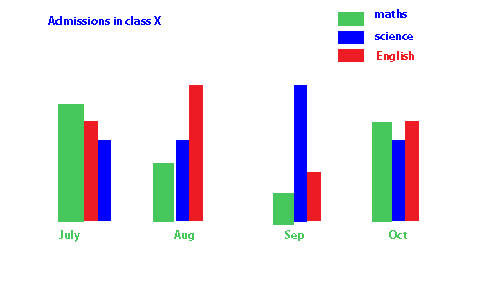
I have a form for student registration where I have fields like:- student_name, class, subject, date_of_admission etc. fields.

can you please guide me to show a comparative chart with monthly/datewise, classwise & subject wise student registration?

Thanks for you support,

Best Regards!

Get a VIP membership