0.00 € (0)
  • Sign Up
  • Sign In
logo-seblod
  • Home
  • Community
  • Resources
  • Store

Fields & Plug-ins

  • Blog
  • Events
  • Forums
  • Showcase
  • Testimonials
  • Users

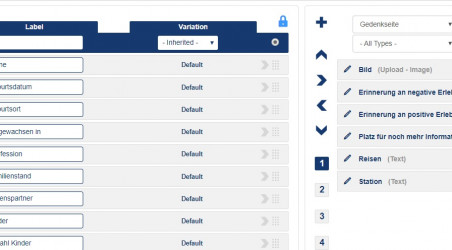
Fields can not save to the "Site form"

39 Posts
dazzafact
7 years ago
2
Topic

Hello 

if i create some new input Fields, the fields can not save to the "Site form"  after saving. It seems this is limited to 33 Fields. 

Get a Book for SEBLOD
1283 Posts
Bucklash
7 years ago
0
Level 1

Maybe this

https://www.seblod.com/resources/tutorials/max-input-vars-quick-example

https://www.seblod.com/resources/tutorials/max-input-vars-quick-example-2

39 Posts
dazzafact
7 years ago
0
Level 1

Thank you, this works!!

Get a Book for SEBLOD
You are here: Home/Community/Forums/Fields & Plug-ins/Fields can not save to the "Site form"

Common

  • About
  • Changelogs
  • FAQs
  • Features
  • Newsletters
  • Terminology

Community

  • Blog
  • Events
  • Forums
  • Showcase
  • Testimonials
  • Users

Store

  • Clubs
  • Extensions
  • Services

Resources

  • Books
  • Extensions
  • Manuals
  • Marketing
  • Tutorials
  • Videos

About Us

  • Contact Us
  • Follow Us on Twitter
  • Like Us on Facebook
  • Star Us on GitHub
  • Meet our Team

Our customers says:


  • SEBLOD makes creating complex websites become an exercise in logic. As if creating powerful websites, were same as playing chess.

    I'm using SEBLOD from the first version to the latest version. The team of developers are spending several years working on this great joomla package.

    Thank you for make my life easier. I admire you.


Testimonials

  • Acceptable Use Policy
  • Imprint
  • Licenses
  • Privacy Policy
  • Site Map

SEBLOD by Octopoos is not affiliated with or endorsed by the Joomla Project or Open Source Matters.
The Joomla logo is used under a limited license granted by Open Source Matters the trademark holder in the United States and other countries.

Copyright © 2008-2026 Octopoos. All rights reserved.